How to show clothes or bags worn, without showing your face
Sellers already know that a photo of a garment or bag actually worn or carried helps buyers picture using it, in a way a flat lay or a hanger shot doesn't. The real problem with showing clothes or bags worn, without showing your face, is that most sellers run their shop alone: there's no stylist or professional model on call, and plenty of people simply don't want their own face attached to their shop. This guide covers the DIY ways to shoot a worn product with the face out of frame, where that gets harder than it sounds, and where ShopShot Studio's On a model style fits if you'd rather skip the shoot entirely.
DIY ways to show clothes or bags worn, without showing your face
None of this requires special equipment, just a bit of planning before you shoot:
- Crop a live model out of frame: if a friend, family member, or employee is willing to wear the piece for a few minutes, frame the shot from the shoulders or collarbone down, or shoot from behind or at an angle, so the camera simply never includes their face. This is the most common way sellers get a worn shot without showing anyone's identity.
- Use a mannequin or dress form: a dress form or bust mannequin gives a garment or bag real shape and drape without a person at all, so there's no face to crop out in the first place. It won't show how the piece moves or sits on an actual body, but it's a reliable, repeatable option if you shoot the same way regularly.
- Angle the shot to keep the face out naturally: shooting from a high angle down at the shoulders, from behind, or tight on the torso or a bag's strap keeps the framing look deliberate rather than like an accidental crop. This works especially well for bags worn over the shoulder or across the body, where the detail that matters is the strap and the bag, not the person carrying it.
Where DIY gets hard
Each of these options works, but all three get harder the more photos you need. Lighting that reads evenly on a flat lay often falls unevenly across a person's shoulders or a mannequin's torso, so matching color and exposure across a full set of photos takes more trial and error than shooting the product alone. Finding someone willing to model, and willing to do it again if a shot doesn't work, isn't always easy for a seller working without a team. And a crop or angle that looked fine in the moment can turn out awkward once you see it next to the rest of your listing photos, which usually means a re-shoot rather than a quick fix in editing.
Where ShopShot Studio's On a model style fits
Among ShopShot's photo styles is On a model: worn or used by a person, face out of frame. You still send only one phone photo of the product itself, the same as any other order; you don't need to find a model, book a second shoot, or photograph a person at all. The example on our homepage's "Pick a look" carousel shows exactly this: a navy woven leather backpack, photographed as a plain phone photo, turned into a shot of that same backpack worn over someone's shoulder, with their face out of frame.
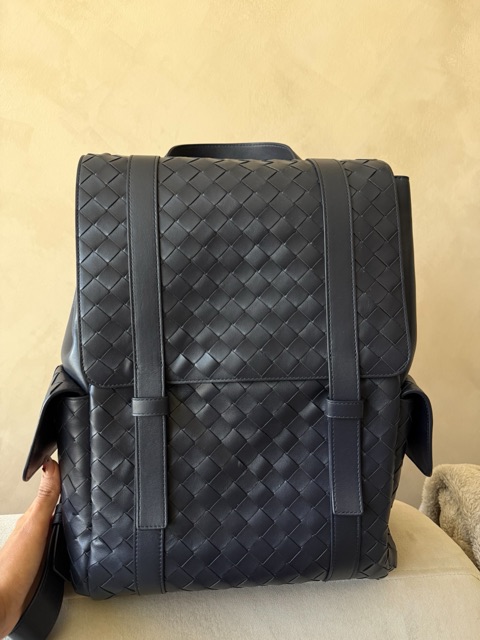
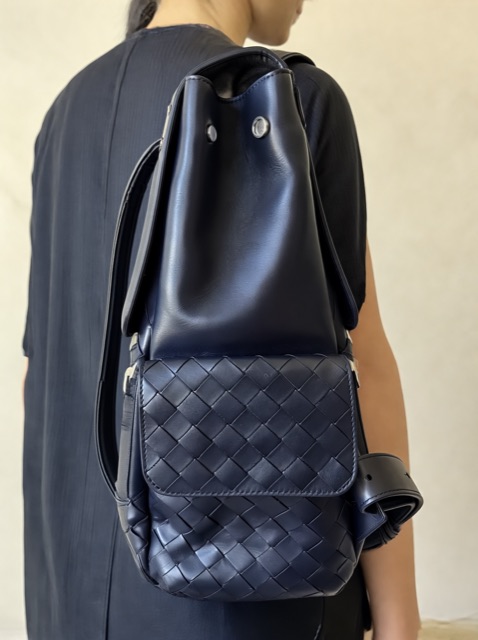
Right now, On a model is listed as one of the looks on the clothing product photos page. It isn't currently one of the configured looks on the bags category page, even though the real example above happens to be a bag. If you sell clothing and want a worn shot without showing your own face, this is the most direct route; for bags specifically, the DIY options above remain the best approach for now. Every image is checked against your original photo before delivery, with one free redo if something doesn't match, and photos are usually delivered by email in about 15 minutes, always within 1 business day, starting at $15. Here's what the packages cost:
Starter
$15 one time
- 5 studio-style product photos
- Delivered by email within 1 business day
- One free redo if it doesn't match your product
- Use in your shop, ads, and social posts
Most popular
Photos + Video
$29 one time
- 5 studio-style product photos
- 5-second product video
- Delivered by email within 1 business day
- One free redo if it doesn't match your product
- Use in your shop, ads, and social posts
Launch Pack
$49 one time
- 10 studio-style product photos
- 10-second product video
- Delivered by email within 1 business day
- One free redo if it doesn't match your product
- Use in your shop, ads, and social posts
Questions
Do I need to send a photo of a person?
No. You send one phone photo of the product itself, like the bag or garment on its own, not a photo of a person wearing it. ShopShot generates the worn, on-model result from that single product photo.
Will my own face be in the photo?
No. The On a model look shows the product worn or used by a person with their face out of frame, so your own face is never in the shot and you don't need to be photographed at all.
Does this work for bags as well as clothing?
On a model is listed today as a look on ShopShot's clothing category page. It isn't currently one of the configured looks on the bags category page, even though the example of this exact style is itself a bag. For bags specifically, the DIY options above are the best route for now.
Can I combine this with another style?
Each order has one look applied to the whole set of photos, chosen when you place the order. If you want two different looks, such as On a model and a studio shot, that means placing two separate orders.