How to photograph tumblers, cups, and drinkware for Etsy and Shopify without the glare
If you sell epoxy tumblers, sublimation cups, or laser-engraved drinkware, you already know the one problem flat or matte products don't have: learning how to photograph tumblers and drinkware for Etsy and Shopify comes down to solving glare first, because a curved, glossy surface catches and bounces light in a way almost nothing else in a product photo does. This guide covers why that curve makes glare harder to control, a simple fix, common mistakes, and where a done-for-you service like ShopShot Studio fits if you'd rather skip the setup.
Why curved, glossy tumblers are harder to photograph than flat products
On a flat product, a stray reflection usually lands in one spot, and you can angle a light or the product itself to move it out of frame. A tumbler or cup doesn't give you that option: because the surface curves away from the camera on every side, a reflection doesn't sit in one place, it wraps around the whole curve. A window, a ceiling light, even your own silhouette can show up smeared across the surface rather than as one clean hot spot you can simply avoid. That's what makes epoxy tumblers, sublimation cups, and mirror-finish or laser-engraved drinkware noticeably harder to shoot clean than a flat tote bag or a matte ceramic mug.
Photographing tumblers and drinkware without glare
The fix for this isn't anything new or specific to drinkware — it's the same core technique we cover in our guide to the reference photo for AI product photos, in the section on photographing reflective or shiny items without glare, and it works just as well on a curved surface as a flat one:
- Shoot through a hole in white foam or poster board: cut a hole roughly the size of your lens in a sheet of white foam board or poster board, and shoot through it. The tumbler then reflects white board instead of your room, your furniture, or you.
- Use soft, diffused window light, not flash: direct flash or on-camera light creates a hard, obvious hot spot on a glossy surface. Even daylight from a window spreads the reflection into something far less distracting.
- Tilt the tumbler a few degrees off-square: a tumbler shot dead straight into the camera tends to reflect the camera and your own silhouette right back. A few degrees of tilt usually moves that reflection out of the shot entirely.
- Wipe off fingerprints and dust right before you shoot: both show up clearly on a glossy, curved surface, more than they would on a matte one.
See that guide's full answer on reflective and shiny items for the complete version of this technique; this is the same approach, not a different one.
Equipment and setup basics
Beyond the glare fix above, the rest of the setup is the same as for any small product: a plain, uncluttered surface, daylight from a window rather than mixed indoor lamps, and something to keep the camera steady. If the tumbler is engraved or printed, get close enough that the design is sharp, but keep the whole item in frame so buyers can still judge its overall shape and size.
Common mistakes to avoid
- Shooting the tumbler dead-on against a window, which reflects the window itself as a bright band across the surface
- Using on-camera flash, which creates a hard, hard-to-crop-out hot spot on a glossy curve
- Leaving fingerprints or dust on the surface, which shows clearly once it's lit for a photo
- Cropping in so close on an engraved design that buyers can't tell the tumbler's overall size or shape
Where ShopShot Studio fits
ShopShot doesn't have a dedicated tumbler or drinkware category or gallery yet. The closest real category page, visually, is home and ceramics, even though a tumbler isn't ceramic — both are glossy, curved items where glare and reflection are the main challenge. But the order form itself isn't limited to a fixed category list: it takes a free-text product name and description, so a tumbler, cup, or piece of drinkware can be ordered the same way any other product can, even without its own landing page. We check every image against your original photo before delivery, with one free redo if something doesn't match. Photos are usually delivered by email in about 15 minutes, always within 1 business day, starting at $15; see our guide to product photography cost for how that breaks down across packages.
Starter
$15 one time
- 5 studio-style product photos
- Delivered by email within 1 business day
- One free redo if it doesn't match your product
- Use in your shop, ads, and social posts
Most popular
Photos + Video
$29 one time
- 5 studio-style product photos
- 5-second product video
- Delivered by email within 1 business day
- One free redo if it doesn't match your product
- Use in your shop, ads, and social posts
Launch Pack
$49 one time
- 10 studio-style product photos
- 10-second product video
- Delivered by email within 1 business day
- One free redo if it doesn't match your product
- Use in your shop, ads, and social posts
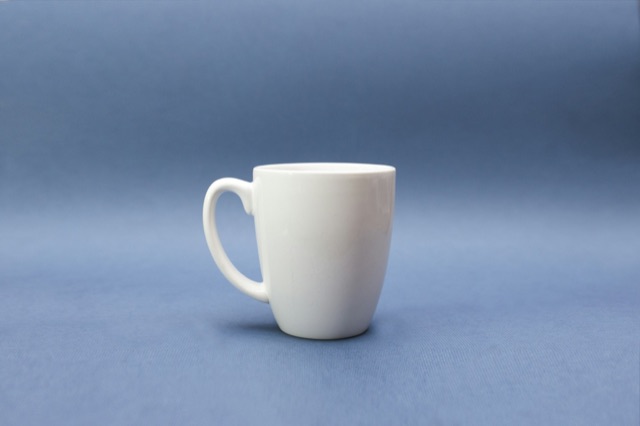
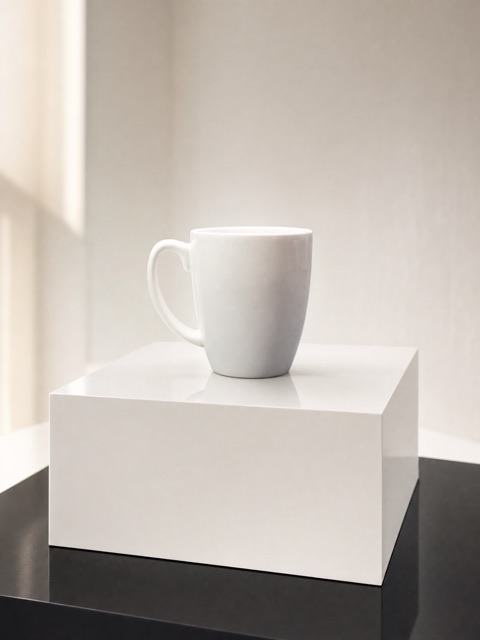
For the real before-and-after example closest to this category, see the home & ceramics product photos page. The pair below is a mug, not a tumbler, but it's the same glossy-surface problem this guide is about:
Questions
How do I photograph a tumbler or cup without glare?
Cut a hole in a piece of white foam or poster board and shoot through it, so the glossy surface reflects white instead of your room. Use soft, diffused window light instead of flash, tilt the tumbler a few degrees off-square to the camera rather than shooting it straight on, and wipe fingerprints and dust off right before you shoot. It's the same core technique as our guide to photographing reflective or shiny items without glare, applied to a curved surface instead of a flat one.
Does ShopShot have a dedicated tumbler or drinkware category?
Not yet. ShopShot's category landing pages with real before-and-after examples are bags, clothing, home and ceramics, and skincare. The closest of those, visually, is home and ceramics, even though a tumbler isn't ceramic. The order form itself isn't limited to that list, though: it takes a free-text product name and description, so a tumbler, cup, or piece of drinkware can still be ordered without its own landing page.
Can engraved or printed designs be shown accurately?
Large designs, colors, and shapes come through accurately. Very small engraved or printed text, like fine laser-engraved lettering, can't be reproduced letter for letter — a limit that applies across every ShopShot category, not just drinkware.
How does ShopShot handle turnaround and redos for tumbler and drinkware photos?
Photos are usually delivered by email in about 15 minutes, always within 1 business day. Every image is checked against your original photo, and if something doesn't match, you get one free redo.