Lifestyle product photos without hiring a photographer or a model
Getting lifestyle product photos — your product shown in a real-world setting instead of on a plain background — usually sounds like it requires a photographer, a model, and a location, which is more than most sellers want to book for a single shoot. It doesn't have to. This guide covers DIY ways to shoot lifestyle-style photos yourself, how Lifestyle differs from two styles sellers often confuse it with, and exactly where ShopShot Studio's Lifestyle style fits today, category by category.
What "lifestyle" product photography actually means
Sellers often use "lifestyle," "editorial," and "on a model" to mean roughly the same thing, but they're three different looks. ShopShot describes them plainly: Lifestyle is "your product in a real-world setting" — think a jacket hanging in a living room, or a mug on a kitchen table, rather than against a plain backdrop. Editorial is "warm, magazine-style color and shadows," a mood and color treatment rather than a setting. On a model is "worn or used by a person, face out of frame," which is about a product being actively used by someone rather than placed in a scene. A lifestyle photo can include props and a setting with no person in it at all; on a model specifically means a person is wearing or holding the product.
DIY lifestyle product photos without a model
You don't need a professional shoot to get a lifestyle-style result yourself:
- Use a real room in your home as the setting: a kitchen counter, a reading chair, a windowsill, or an entryway hook all work, as long as the space is tidy and the product is clearly the main subject.
- Add a few everyday props, not a full set: a coffee mug, an open book, a plant, or a folded blanket nearby can suggest a real-world scene without turning into clutter that competes with the product.
- Stage without a person: hang a jacket on a hook, set a bag on a bench by the door, or place a candle on a shelf. None of this needs a model; the setting itself does the work "lifestyle" is going for.
- Shoot in daylight, from a window: the same light advice that applies to any product photo applies here — soft window light reads more natural than an indoor lamp or flash in a "real-world" scene.
- Keep the product the clear focus: a lifestyle shot still has to work as a product photo first. If the props or background pull more attention than the product, pull back on the staging.
Where ShopShot Studio's Lifestyle style fits
Lifestyle is one of ShopShot's named style options, and it's available to every customer through the order form, in any product category — the order form offers all of ShopShot's styles regardless of what you're selling. Here's exactly how far that goes today, category by category:
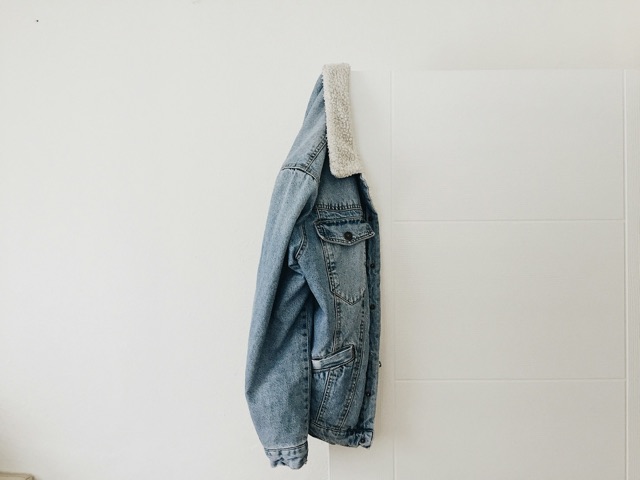
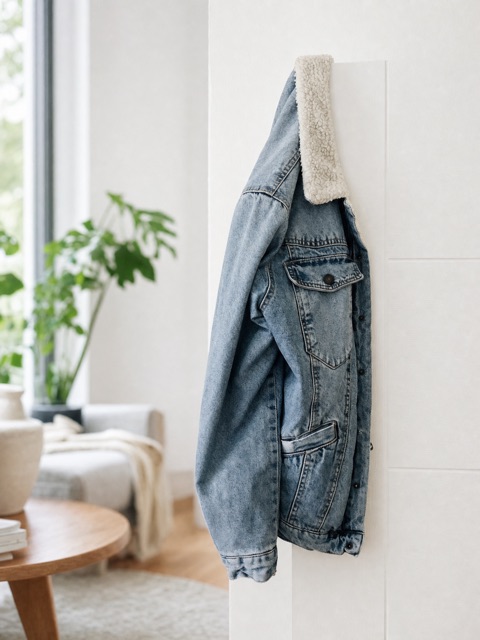
- The clothing category page is the only one that currently shows a real, demonstrated Lifestyle example: a denim jacket photographed on a phone against a plain wall, turned into the same jacket hanging in a styled living room setting.
- The home and ceramics category page lists Lifestyle as one of its available looks, but doesn't yet show a demonstrated example of it on that page.
- The bags and skincare category pages don't currently list or demonstrate Lifestyle among their example looks. That's a gap in what those pages show, not a limit on what you can order: you can still select Lifestyle for a bag or a skincare product through the order form.
Every image is checked against your original photo before delivery, with one free redo if something doesn't match. Photos are usually delivered by email in about 15 minutes, always within 1 business day, starting at $15.
Starter
$15 one time
- 5 studio-style product photos
- Delivered by email within 1 business day
- One free redo if it doesn't match your product
- Use in your shop, ads, and social posts
Most popular
Photos + Video
$29 one time
- 5 studio-style product photos
- 5-second product video
- Delivered by email within 1 business day
- One free redo if it doesn't match your product
- Use in your shop, ads, and social posts
Launch Pack
$49 one time
- 10 studio-style product photos
- 10-second product video
- Delivered by email within 1 business day
- One free redo if it doesn't match your product
- Use in your shop, ads, and social posts
The pair below is the real demonstrated example from the clothing category page:
If you want the product worn by a person instead of placed in a scene, that's the On a model style, not Lifestyle — see our guide to showing products worn without showing your face. And if you're weighing a DIY approach against a done-for-you service generally, our AI photo tools vs. done-for-you product photos guide covers that comparison. For more on shooting clothing specifically, including the denim jacket's category, see our guide to photographing clothing for Etsy.
Questions
What does the Lifestyle style actually show?
Lifestyle places your product in a real-world setting, rather than on a plain background or a styled studio backdrop. It's one of ShopShot's named style options, and it's available to every customer through the order form, regardless of your product category.
Can I get lifestyle photos for a bag or skincare product?
Yes. Lifestyle is a style option on the order form for every customer, in any category. The bags and skincare category pages don't currently list or demonstrate Lifestyle among their example looks, but that doesn't mean it's unavailable for those products — you can still select it when you place your order.
What's the difference between Lifestyle, Editorial, and On a model?
Lifestyle places your product in a real-world setting. Editorial gives it warm, magazine-style color and shadows. On a model shows the product worn or used by a person, with their face out of frame. They're three separate style options, and a single order uses one look for the whole set of photos.